Find the users you never built for
Someone is already using your app for a reason you never planned. How to find those groups, with a deep research prompt that proves each one is real and where they hang out.

·5 min read
On this page
Prospect Ping is my app that alerts baseball fans when a minor league player they follow is in the lineup, at bat or pitching. I built it for one group: the families of minor league players.
Then other people found it. Card collectors tracking the prospects whose cards they own. Fantasy baseball players chasing call-ups before the news broke. A college team following its former players in the pros. Even the players themselves, checking their own stats. Those four groups I never built for are now most of my users.
This guide is how to find yours on purpose instead of by luck.
The short version
Someone is already using your app for a reason you never planned. You can't see them because you describe your app in your own industry's words, and they found it by describing it differently.
Strip your app down to what it actually does, in plain words with no industry terms, and new groups of users appear. The prompt below does that for you, then goes looking for proof that each group is real.
It happens to famous products too
| Product | Built for | Ended up famous for |
|---|---|---|
| WD-40 | Stopping rust on missile parts | Squeaky hinges, stuck zippers, crayon on walls. Its maker lists more than 2,000 uses, and customers came up with them. |
| Rogaine | Minoxidil was a blood pressure drug | Its side effect, hair growth |
| Ozempic | Semaglutide was made for type 2 diabetes | Weight loss, after people noticed it cut their appetite |
What people miss: the makers were often among the last to see it. And look at Rogaine: the side effect became the product. Your worst review might be someone else's favorite feature. The thing you apologize for could be exactly what another group is searching for.
Why you can't see them
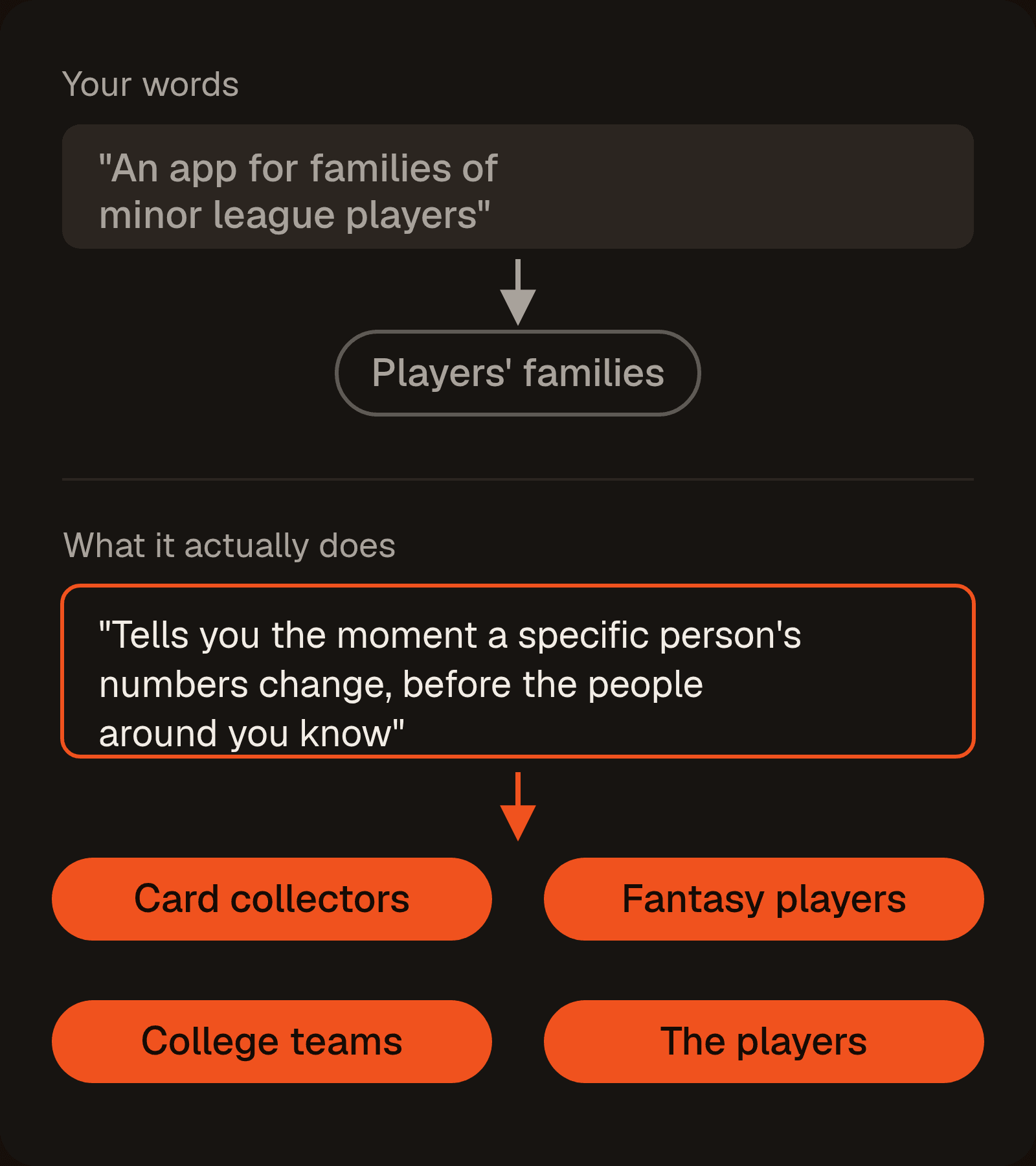
You describe your app the way your App Store page does. "An app for the families of minor league players" only ever leads back to families.
Now describe what it does with no baseball words at all: "tells you the moment a specific person's numbers change, before the people around you know." Suddenly you can see card collectors and fantasy players. Same app, different sentence.
That's the whole trick, and it's something AI is good at: rewording your app a hundred ways until one of those descriptions fits someone you never thought of.
The prompt
It works in three steps:
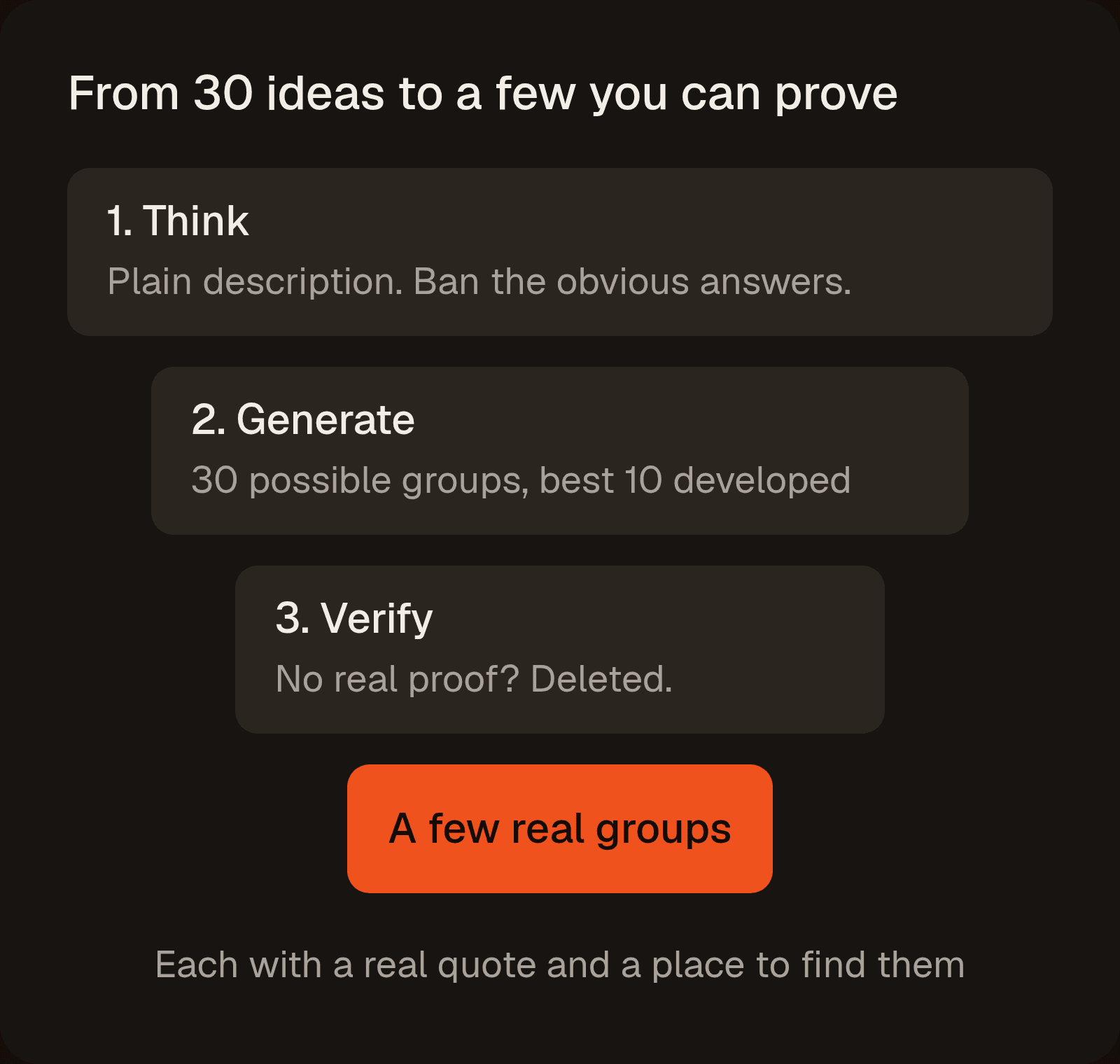
- Think. It rewrites what your app does four times, each more plain than the last, until no industry words are left. It also lists the obvious answers ("students", "small business owners") so it can ban them.
- Generate. It comes up with 30 possible groups from the plain description, then develops the best 10. At least four have to sound a little crazy, because those are often the real finds.
- Verify. It searches for real proof: App Store reviews, posts and tutorials where someone uses an app like yours for something new. Any group it can't prove gets deleted.
Best results: run it in the deepest research mode you have: ChatGPT or Gemini Deep Research, or Claude with extended thinking and web search on. Swap the two [BRACKETS] for your app and paste the whole thing in once.
Find customer groups for my product that I never built it for.

My product: [WHAT IT DOES]
Originally built for: [WHO I BUILT IT FOR]

Work in three parts, in one pass. Parts 1 and 2 need no searching at all: do all of that thinking before you open a single link, and print part 1 as the opening section of your report. If your output doesn't start with the four rungs of the ladder, you skipped the step that makes this work.

=== PART 1: THINK (no searching yet) ===

Do not propose any new audiences yet. The only audiences you may name here are the obvious ones in item 2, which exist so we can ban them in part 2.

1. THE LADDER. Restate what my product mechanically does, four times, each one more abstract than the last. Level 1 can use my industry's words. Level 4 must contain zero nouns from my industry - no product category, no market, no jargon a competitor would use. A good level 4 sounds like: "tells you the moment a specific thing you care about changes, before the people around you know." A bad level 4 sounds like: "helps people stay organized" - that's a vague benefit, not a mechanic.

2. THE OBVIOUS LIST. Name the 5 audiences any competitor would name in ten seconds if I asked them who else might use this. Be honest and include the boring ones. This becomes the ban list, so it has to be the real answer, not a strawman.

3. THE COMPLAINT LIST. My product's 5 biggest limitations and likely one-star complaints - what it does badly, what it refuses to do, who it annoys. Include the ones I'd be defensive about.

4. THE WORKAROUND LIST. 5 ways someone could get roughly this outcome today without my product at all - the spreadsheet, the group chat, the alert they set manually, the person they pay, the thing they check every morning. Describe the actual mechanics of each, not the category.

Print all four before continuing. Do not propose a single audience beyond the obvious list.

=== PART 2: GENERATE (still no searching) ===

Now ignore who I built it for. You have explicit permission to reinterpret my product far past my stated market. I care more about being surprised than about being right. Work from level 3 and level 4 of the ladder, never from my product category.

Generate 30 candidates and print all 30 first as a bare numbered list, names only. Then develop the best 10. I want to see the discard pile - the good one is often sitting in it.

Build them with these five lenses, and use every lens at least twice:
- JOB: who else needs the level 4 outcome, for a completely different reason?
- TRIGGER: what exact moment sends someone looking for this today? Who lives inside that moment on repeat?
- WORKAROUND: who is doing one of the part 1 workarounds by hand right now, and hates it?
- CONSTRAINT: who wants this but is blocked by money, skill, time, access or rules - and who has given up on this job entirely because the tools cost too much, need too much skill, or don't exist where they live? Name the blocker precisely.
- ADJACENT ROLE: name the event, object or person my product watches or acts on. Who ELSE is standing around that same thing for their own reason? List every role in the room, not just my customer.

Rules:
- Label every group with a distance band: NEAR (adjacent to my stated market), ONE STEP OUT, or SOUNDS INSANE. At least 4 must be SOUNDS INSANE. Do not self-censor a group for looking impractical - judging that is my job, not yours.
- At least 3 groups must be people who would never think to look at a product in my category at all.
- Banned: the 5 obvious answers from part 1, and any group that is my stated market reworded, resegmented, or handed an adjective. Also banned as group names: students, small business owners, hobbyists, freelancers, content creators, busy professionals, enthusiasts, beginners.
- Demographics are banned as the defining feature. Age, gender, income and location may describe a group but can never be what makes it a group.
- Every group must be nameable as something a real person would put in their own bio, or as a place I could open in a browser. "Parents" fails. "Travel-team parents who run the team group chat" passes.
- For each group, name the sub-group who has this need in the most extreme form. Extreme users post about it, build spreadsheets for it and complain loudly, which is how we find evidence in part 3.

One line each: GROUP - BAND - the lens it came from - the job in their words - what they use instead today - a 0-100 guess at how likely it is this group already exists AND is already looking. That guess is speculation and does not carry into part 3 as evidence.

=== PART 3: VERIFY (now search) ===

Now try to kill all 10 groups and show me the survivors, with proof.

VERIFY IN THIS ORDER: the 3 highest-likelihood groups first for cheap wins, then EVERY group in the SOUNDS INSANE band, then the rest. If you run out of search budget it must never be a SOUNDS INSANE group you skipped - those are the reason I'm running this.

WHERE TO SEARCH:

0. My own data, if I pasted any in above. If I have given you my reviews, support emails, cancellation replies or analytics, mine those FIRST and treat them as the strongest evidence available. Nobody can fabricate my own inbox.

1. Competitor reviews. Highest yield on the open web, because people describe their real use case unprompted.
   a. Find apps in my space:
      https://itunes.apple.com/search?term=YOUR+SEARCH+WORDS&entity=software&limit=25&country=us
      That returns trackId (the app ID) and userRatingCount. Skip anything under roughly 500 ratings, there is no review corpus worth reading.
   b. Read their reviews:
      https://itunes.apple.com/us/rss/customerreviews/page=1/id=APPID/sortBy=mostRecent/json
      page=1 through page=10, 50 reviews each - page 11 returns an error, so stop at 10. Swap /us/ for /gb/, /ca/, /au/ or /in/ to get a completely different set per storefront.
   c. Do NOT try to read reviews on apps.apple.com. That page contains star counts and zero review text - the reviews load separately - so if you "read" that page you are inventing the quotes. Use the RSS URL above.
   Read for one thing: reviewers describing a use the app clearly was not built for. Those are my groups, already in the wild.

2. Off-label tutorials. Find posts, videos and threads where someone TEACHES other people to use a product like mine for a purpose it was never sold for. Someone bothering to write the tutorial is the single strongest proof that a group already exists.

3. Aggregate demand:
   https://suggestqueries.google.com/complete/search?client=firefox&q=YOUR+QUERY
   Best shapes: "using [COMPETITOR] for" and "is there an app like [COMPETITOR] but for". Completions only appear when lots of real people type that phrase, so treat each one as a lead worth chasing, not as proof that a group exists.

4. Workaround and technical talk:
   https://hn.algolia.com/api/v1/search?tags=comment&query=YOUR+PHRASE
   Use unquoted phrases like: I use it for / anyone else use / wish there was one for. Do not wrap them in quotes, that endpoint treats quotes as exact-match and will return nothing. Each hit has an objectID that maps to news.ycombinator.com/item?id=OBJECTID.

5. Reddit, forums, YouTube, Facebook groups, and the industry filter on G2 or Capterra if my product is B2B. Reddit blocks most AI crawlers, so if you cannot actually open the page, do not describe what is on it. Hand me the search string to run myself and mark it NOT VERIFIED.

EVIDENCE RULES, non-negotiable:
- Only sources you actually opened in this session count. Do not recall a community, thread or number from memory.
- Every group needs one VERBATIM sentence written by a real person, 30 words or fewer. Not a paraphrase, not a summary. Copy it exactly, bad grammar and all.
- If you cannot find a real quote AND a real named place, DELETE the group. Do not describe it, soften it, or pad the list to a round number. Three proven groups beat eight plausible ones.
- If you found something but could not open or confirm it, keep it and write NOT VERIFIED beside it. Never quietly promote a guess to a fact.
- Never invent a community. If none exists for a group, write NO COMMUNITY FOUND. That is a real and useful result.
- Do not give me a confidence score on the final list. You rate your most familiar answers highest, which is backwards for this job. Rank by evidence tier instead.

FOR EACH SURVIVING GROUP:
- The group, named the way they would name themselves
- The job and the moment: what they are trying to get done, and the specific situation that sends them looking. Not a demographic.
- What they would have to fire to hire me: the spreadsheet, the app, the alert, the person, the habit
- Buyer vs user: whether the person who would pay and the person who would use it are the same person
- EVIDENCE: the verbatim quote, who wrote it (username or reviewer nickname), the date, the star rating if it is a review, the source type, and the exact URL I can reopen
- EVIDENCE TIER: A = someone is already doing this with a product like mine. B = the group clearly expresses the need, but nobody is visibly using a product like mine for it. C = reasoning only, no artifact found.
- WHERE: the named place they gather (subreddit, Discord, Facebook group, forum, newsletter, hashtag, event, trade publication), roughly how many people are in it, one search string that resurfaces this group from scratch, and concretely how I get in front of 100 of them this week
- COST TO THE CORE: what serving this group would force me to build, support or compromise for the users I already have, and whether that conflicts
- What would have to be true for me to conclude this group is not real

RANK by evidence tier first (A above B above C), then by how cheaply I can reach them. Do not rank by how excited you are about an idea.

Then, for the top 3 only, design a 7-day test that changes nothing about my product:
- the exact headline or post title, written in that group's vocabulary and not mine
- the one specific place to put it
- the number that counts as a real signal, and the number that means no

Finish with one line: which single group you would bet on, and what would prove you wrong.
Check three links before you trust it
AI asked to find communities will invent them: believable subreddit names, realistic usernames, quotes nobody ever wrote. The prompt demands a real quote and link for every group, but check anyway. Open three links from the results:
- App Store review quotes: reopen the review link it gave you and search the page for the quote. If the name and date match, it's real. (Googling these won't work, because Google doesn't show App Store reviews.)
- Reddit, forum and YouTube quotes: paste the sentence into Google inside quotation marks. Zero results means the AI wrote it.
- Communities: open the link. A made-up subreddit shows an error. A real one shows a member count you can compare to what the AI claimed.
If one link is fake, run the search part again and throw out everything it marked NOT VERIFIED.
Reading the results
- Read the far-fetched groups first. The near ones are the groups you'd have thought of in the shower. The surprising ones are why you ran it.
- Check the four plain descriptions at the top. Every group comes from the last one. If it came out as a vague benefit like "helps people stay organized" instead of what the app actually does, everything after it is mush. Make it try again.
- Weigh the cost to your current users. The prompt lists what each new group would make you build or change. A new group isn't worth losing the people you already have.
Where else to look, no AI needed
The best proof is often already in your own accounts, where nobody can fake it. Paste anything you find into the prompt too.
- Your 5-star reviews and support emails. Anyone describing a use you didn't build for is a group, not a one-off.
- Your competitors' 1-star reviews. Complaints from people who were never the target market are loud signals.
- Odd spots in your analytics. A country, device or time of day you can't explain is often a group in disguise.
- The words people searched to find you. Google Play Console shows them for your app, and Search Console for your website. Apple only shows "App Store Search" as one lump.
You can also read demand off Google's autocomplete in ten seconds. Open this in a browser, with a competitor's name in the brackets:
https://suggestqueries.google.com/complete/search?client=firefox&q=using+[COMPETITOR]+for
It works best on apps built for one narrow purpose. using strava for comes back with treadmill, walking and swimming. is there an app like duolingo but for comes back with sign language, the bible and exercise. Each one is a real group using something for a reason it wasn't sold for. On a broad app like Notion it returns mush, so skip it there.
How to use it
- Fill in the two brackets. What your app does in plain words ("sends an alert when a player's stats change", not "keeps fans connected"), and who you built it for.
- Turn on deep research and paste it once. Add your own reviews, support emails and analytics surprises at the bottom if you have them.
- Test before you build. Run the 7-day test it designs for your top group, and change nothing about your app until someone from that group shows real interest. Then take that group to find your first users.
And the cheapest version, the one WD-40 actually did: ask your users in public what they use your app for, and read the answers.
Get better at growing apps.
New case studies and guides on how apps grow. Free, straight to your inbox.
Written by Matt Neves
I study how apps grow and break down the case studies for 20,000+ app builders as @agenticmatt. I test what I learn on my own apps.
More about meKeep reading
Acquisition · 2 min read
Find your first users with AI
Your first users are already posting about the problem your app solves. An AI research prompt that finds those threads and groups, and how to show up without spamming.
Acquisition · 2 min read
Get your app recommended by AI (AI SEO)
A 3-step prompt process to find out why ChatGPT, Claude, Grok and Perplexity aren’t recommending your app, and exactly how to fix it.
Acquisition · 5 min read
How to grow your app with no budget
Ads rent people's attention. Dropbox, Gymshark and Tinder borrowed it for free. The three places to borrow attention for your app, and how to start this week.